
Security Overview
SetGet is designed with security as a foundational requirement. The platform protects your data through multiple layers: strong authentication, granular authorization, encrypted communication, secure session management, and administrative controls. This page provides an overview of the security model and links to detailed documentation for each area.
Authentication
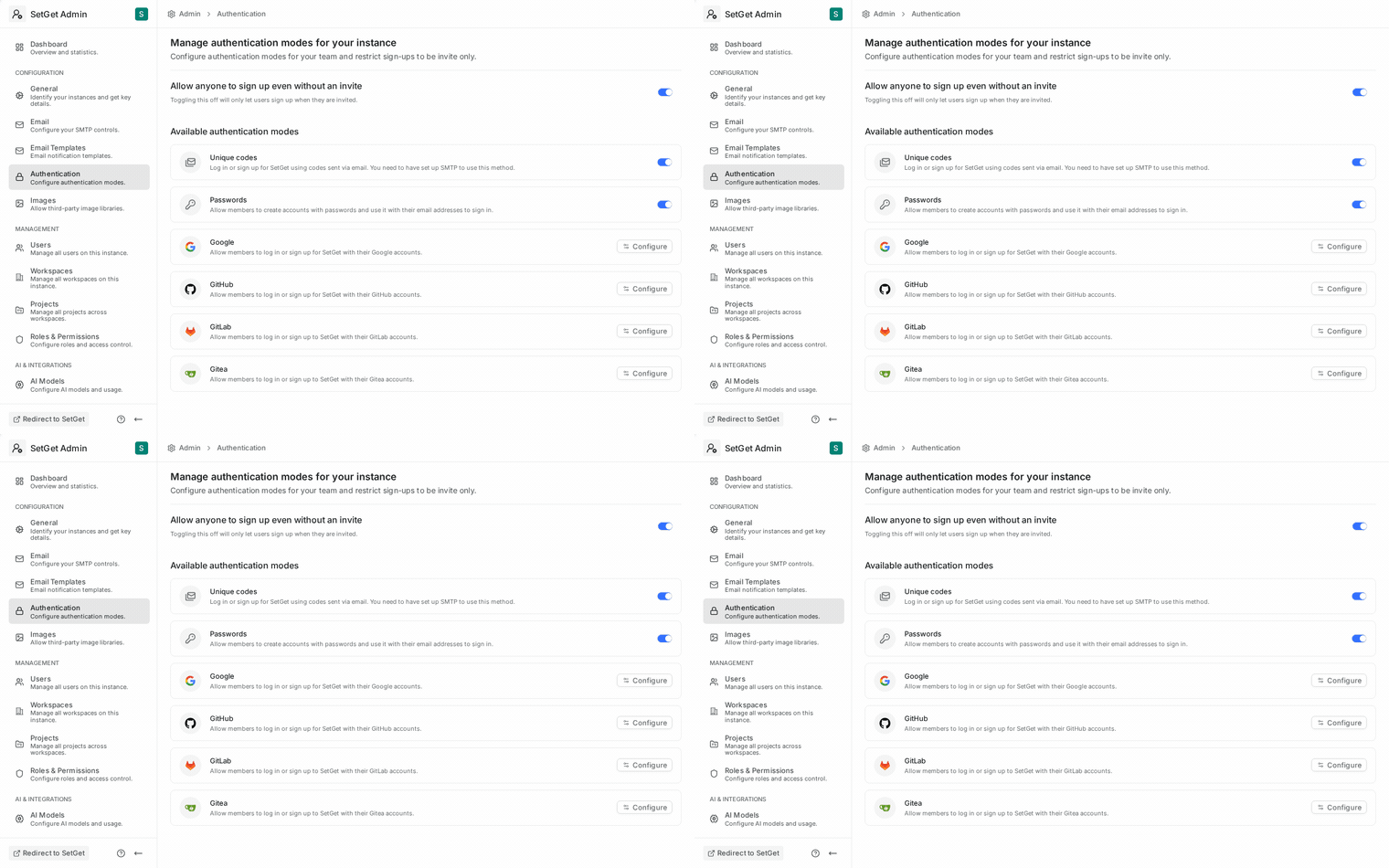
Authentication verifies that a user is who they claim to be. SetGet supports multiple authentication methods to fit different organizational requirements.
Email and password
The default authentication method. Users register with an email address and a strong password. Passwords are hashed using a modern, computationally expensive algorithm before storage. SetGet never stores passwords in plain text.
Password requirements:
| Requirement | Detail |
|---|---|
| Minimum length | 8 characters |
| Complexity | Must include uppercase, lowercase, and a number or special character |
| Reuse prevention | Cannot reuse the last 5 passwords |
| Brute force protection | Account lockout after repeated failed attempts |
Magic link authentication
Users can sign in without a password by requesting a one-time authentication code sent to their email. The code is time-limited and single-use. This method is useful for users who prefer not to manage passwords.
OAuth providers
SetGet supports third-party authentication through OAuth 2.0 providers:
- Google — sign in with a Google account
- GitHub — sign in with a GitHub account
- GitLab — sign in with a GitLab account
- Gitea — sign in with a Gitea account
Each provider must be configured by a workspace or instance admin. See OAuth Providers for setup instructions.
Single Sign-On (SSO)
Enterprise teams can configure SAML-based SSO to authenticate users through their corporate identity provider (IdP). SSO centralizes authentication management and can be enforced as the only allowed sign-in method. See SSO for configuration details.
Multi-Factor Authentication (MFA)
MFA adds a second verification step after password authentication. SetGet supports TOTP (Time-based One-Time Password) using authenticator apps like Google Authenticator, Authy, or 1Password. Workspace admins can enforce MFA for all members. See MFA for setup and enforcement.
Authorization
Authorization determines what an authenticated user is allowed to do. SetGet uses a role-based access control (RBAC) system with roles at multiple levels.
Workspace roles
| Role | Description |
|---|---|
| Owner | Full control over the workspace: billing, settings, member management, all projects |
| Admin | Manage workspace settings, members, and all projects; cannot transfer ownership or manage billing |
| Member | Access projects they are assigned to, create work items, participate in chat |
| Guest | Limited access to specific projects and channels they are explicitly invited to |
Project roles
Within each project, members can have additional role-based permissions:
| Role | Description |
|---|---|
| Admin | Full control over the project: settings, states, labels, members |
| Member | Create and edit work items, participate in project discussions |
| Viewer | Read-only access to project work items and pages |
Permission inheritance
- Workspace owners and admins automatically have admin access to all projects.
- Project-level roles apply only within that project.
- Guest users have no implicit access — every permission must be explicitly granted.
See Roles and Permissions for the complete permission matrix.
Data protection
Encryption in transit
All communication between the client (browser) and the SetGet server is encrypted using TLS (HTTPS). This includes:
- Web application traffic
- API requests and responses
- WebSocket connections for real-time features
- File uploads and downloads
SetGet enforces HTTPS and does not serve content over unencrypted HTTP in production.
Encryption at rest
Data stored in the database and file storage is protected by:
| Layer | Protection |
|---|---|
| Database | MongoDB encryption at rest (if enabled at the infrastructure level) |
| File storage | MinIO server-side encryption for stored objects |
| Backups | Encrypted backup storage (infrastructure-dependent) |
| Passwords | One-way hashed with bcrypt; never stored in plain text |
| Tokens | Session tokens are cryptographically random and stored hashed |
Data isolation
Each workspace's data is logically isolated:
- Workspace data is scoped by workspace ID in all database queries.
- There is no cross-workspace data leakage through the API.
- File storage uses workspace-scoped paths and access controls.
Session management
SetGet uses token-based sessions to manage authenticated access:
- Sessions are created upon successful authentication.
- Each session is tied to a specific device and IP address.
- Sessions have a configurable timeout period.
- Users can view and revoke their active sessions.
- Admins can revoke sessions for any workspace member.
See Session Management for details on viewing, revoking, and configuring sessions.
Session security features
| Feature | Description |
|---|---|
| Session binding | Sessions are tied to the originating IP and user agent |
| Automatic expiry | Sessions expire after a configurable inactivity period |
| Concurrent session limit | Admins can set a maximum number of concurrent sessions per user |
| Revocation | Users and admins can revoke any active session immediately |
| Secure cookies | Session tokens are stored in HttpOnly, Secure, SameSite cookies |
API security
The SetGet API enforces authentication and authorization on every request:
| Protection | Detail |
|---|---|
| Authentication required | All API endpoints (except public pages and auth routes) require a valid session |
| Rate limiting | API endpoints are rate-limited to prevent abuse |
| Input validation | All inputs are validated and sanitized before processing |
| CORS policy | Cross-origin requests are restricted to allowed origins |
| CSRF protection | State-changing requests require CSRF tokens |
Audit and compliance
Activity logging
SetGet logs security-relevant events for audit purposes:
| Event | Logged details |
|---|---|
| User sign-in | Timestamp, IP address, authentication method |
| User sign-out | Timestamp |
| Failed sign-in attempt | Timestamp, IP address, email attempted |
| Password change | Timestamp, user |
| MFA enable/disable | Timestamp, user |
| Session revocation | Timestamp, who revoked, which session |
| Member role change | Timestamp, who changed, old role, new role |
| Workspace setting change | Timestamp, who changed, which setting |
Data export
Users can request an export of their personal data, including:
- Profile information
- Work items they created
- Messages they sent
- Files they uploaded
This supports GDPR and similar data protection regulation compliance.
Security configuration checklist
For workspace administrators setting up a secure environment:
| Step | Priority | Documentation |
|---|---|---|
| Enable HTTPS | Critical | Infrastructure setup |
| Configure OAuth providers | High | OAuth Providers |
| Set up SSO | High (enterprise) | SSO |
| Enforce MFA | High | MFA |
| Configure session timeout | Medium | Session Management |
| Set up group sync | Medium | Group Sync |
| Review member roles | Medium | Roles and Permissions |
| Configure notification preferences | Low | Notification Preferences |
WARNING
Security is only as strong as its weakest link. Enabling MFA, configuring SSO, and regularly reviewing active sessions are the most impactful steps you can take to secure your workspace.
Related pages
- SSO — SAML-based single sign-on configuration
- Group Sync — map IdP groups to workspace roles
- MFA — multi-factor authentication setup and enforcement
- Session Management — view and revoke active sessions
- OAuth Providers — configure third-party authentication
- Roles and Permissions — workspace and project role definitions
- Workspace Members — manage member access